
TL;DR: Headless commerce decouples your storefront from the back-end, so you can launch a mobile app, PWA or voice-shopping experience without rebuilding the whole platform. For SMBs of 6–200 staff that means faster time to market, genuine omnichannel reach, and the freedom to test new front-ends independently. The trade-off is more moving parts — it suits businesses hungry to innovate, not those wanting one tidy box.
A client of mine sells outdoor gear out of a small warehouse in Centurion. Last year he wanted a mobile app for his regulars. Simple enough, you’d think. Except his shop sat on a rigid, all-in-one platform, and every quote he got came back at six figures with a four-month timeline. He’d boxed himself in without realising it — the front-end his customers saw was welded to the engine that ran his orders, and he couldn’t touch one without disturbing the other.
That welding is exactly what headless commerce takes apart. You split the storefront your customers see from the back-end that handles orders, stock, and payments, and the two talk to each other through APIs. Once they’re separated, you can build a new front-end — an app, a progressive web app, a voice-shopping experience — without ripping up the platform underneath. For a South African SMB with 6 to 200 staff, that’s the difference between adapting in weeks and being quoted six figures to do it the old way.
Why Headless Commerce Matters for SMBs
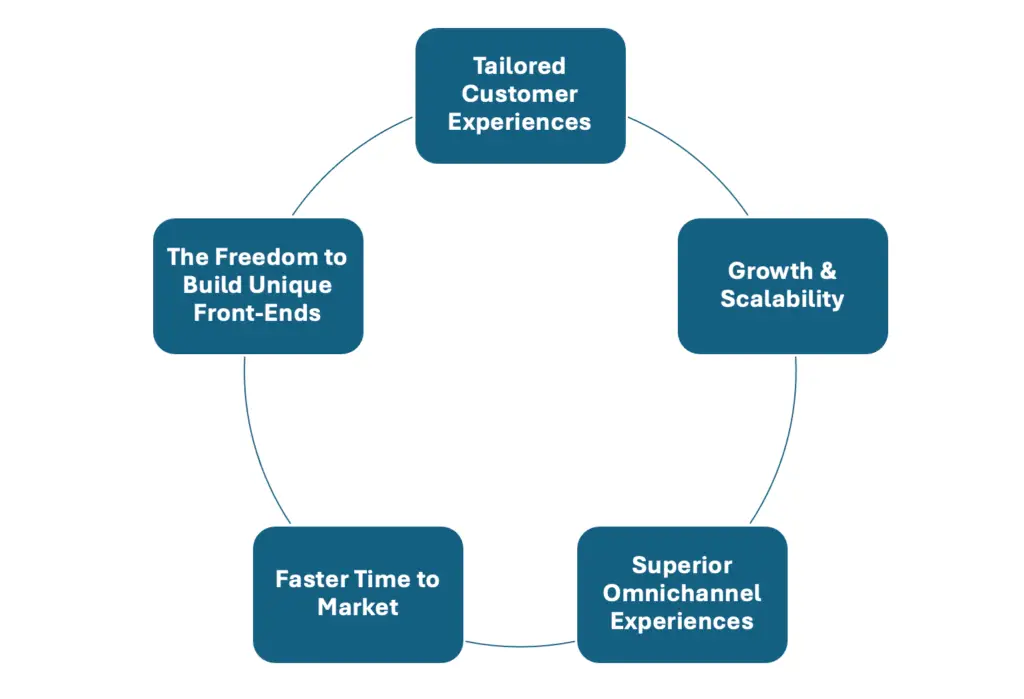
The freedom to build the front-end you actually want
Traditional eCommerce platforms tie the front-end (the “head”) to the back-end, which quietly dictates how you’re allowed to present your products. Headless commerce removes that constraint. You build the storefront you want — a mobile app, a progressive web app, even a voice-enabled checkout — without rewriting the platform every time you have a new idea. Your design decisions stop being hostage to your shopping cart.
Faster time to market
Rolling out a new feature on a rigid, one-size-fits-all platform is like trying to sprint in gumboots. With a headless commerce approach you build and update the front-end on its own schedule. You can ship a redesign, test a new layout, and respond to what customers are actually doing — without waiting months for a platform-wide update that touches everything at once.
Omnichannel that actually holds together
Your customers move between phone, laptop and tablet without thinking about it, and they expect the brand to feel the same wherever they land. Headless commerce lets you serve consistent branding and functionality across every channel from one back-end. If you’ve been hunting for “headless commerce platform examples” to see how the bigger brands pull it off, you’ll notice the same thing every time — multiple channels, one source of truth, no patchwork.
Room to grow without breaking
One of the real benefits of headless eCommerce is how cleanly it scales. With the back-end separated out, you can harden it to absorb traffic spikes — a Black Friday rush, say — without your storefront buckling under the load. And when you decide to add a channel or expand into a new market, you extend rather than replatform. No tearing the whole thing down to bolt one new thing on.
Customer experiences tailored to your shop
Personalisation is where smaller shops out-punch the big retailers. A headless setup lets you plug in proper personalisation — AI-driven recommendations, targeted promotions, and dynamic content — without wrestling a monolithic platform that fights you at every turn. The offers that make your customers feel known become things you can ship, not things you wish you could.
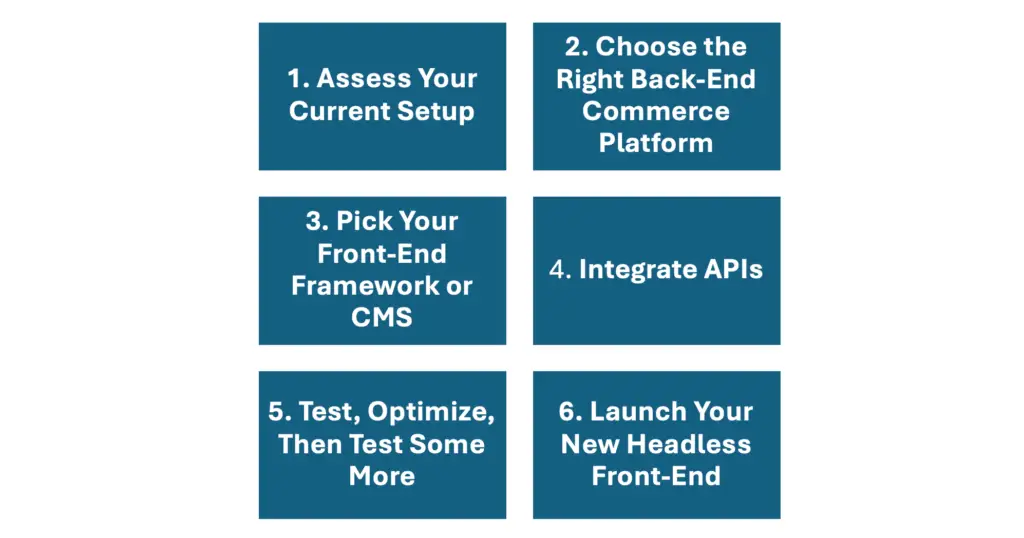
How to Implement Headless Commerce, Step by Step
So you can see the benefits of headless eCommerce and you want to move. Good. Here’s how an SMB does it without falling into the usual holes.
Step 1: Assess your current setup
- Inventory your systems: List what you’re running — your eCommerce platform, your CMS (Content Management System), CRM (Customer Relationship Management), analytics, and anything else in the stack.
- Find the pain points: Where do things choke? Maybe performance drags under a traffic surge, or you simply can’t add a front-end feature without a developer disappearing for a fortnight.
The point: you can’t plan a route without knowing where you’re starting from. Write it all down — what you keep, what you replace, what you upgrade.
Step 2: Choose the right back-end commerce platform
Your back-end is the engine room: orders, inventory, customer data. You want it solid and flexible. Some headless commerce platform examples worth a look:
- Shopify Plus: Mature APIs and an active partner ecosystem for front-end development.
- BigCommerce: Known for its headless support and a wide range of plug-and-play integrations.
- CommerceTools: Built from the ground up for headless, on a microservices architecture.
Whichever you pick, confirm it covers what you need now and where you’re heading next. The cost of getting this wrong is a migration you’ll resent.
Step 3: Pick your front-end framework or CMS
Headless means you can use almost any front-end technology — React, Vue, Angular — or a headless CMS like Contentful or Strapi. The right choice comes down to three things:
- Your team’s skills: If your developers love React, a React-based option like Next.js will save you pain.
- Performance goals: Want fast load times and SEO-friendly pages? Lean towards frameworks built for speed — Next.js with server-side rendering, for instance.
- Customisation needs: The more bespoke the front-end, the more flexible the framework needs to be.
Step 4: Integrate the APIs
Your front-end and back-end talk through APIs. This is the heart of headless commerce, and it’s where most of the real work lives. The integrations you’ll typically need:
- Product & catalogue APIs: Pull product listings, categories, pricing, and stock levels.
- Cart & checkout APIs: Handle the whole purchase flow, from add-to-cart through to a completed payment — and for a South African shop, that means making sure local gateways like PayFast or Peach Payments slot in cleanly.
- Authentication & profile APIs: Manage login, registration, and user data.
- Analytics & tagging: Make sure Google Analytics and your other tracking can read both ends, so you’re not flying blind on the numbers that matter.
Step 5: Test, optimise, then test again
- Functional testing: Do all the buttons work? Does checkout run from start to finish without a stumble?
- Performance testing: Use tools like Google Lighthouse or GTmetrix to check load times honestly.
- UX testing: Watch real people use the site or app. They’ll show you friction you’d never spot yourself.
One thing people forget: mobile. A headless site that flies on desktop but limps on a phone will quietly bleed sales — and in this market, most of your customers are on a phone.
Step 6: Launch your new front-end
Once testing holds up, schedule the launch. Keep three things in mind:
- Staggered rollouts: If you’ve got multiple channels — website, app, the rest — launch in stages to keep the risk contained.
- Monitoring: Watch error rates, load times, and user feedback closely in the first few days. That’s when problems show.
- Ongoing optimisation: Headless isn’t a one-and-done. You’ll keep refining the front-end, adding features, and adjusting as the market moves.
Quick Wins for SMBs Going Headless
- Personalised promotions: With a headless setup you can plug in personalisation engines that serve targeted coupons or product recommendations.
- Faster load times: A decoupled front-end can be optimised hard for speed, which lifts both your SEO and the patience of your customers.
- Proper A/B testing: Changing the front-end quickly means you can run several tests at once — product page layouts, calls-to-action, even colour schemes — without risking downtime.
- Easy expansion: Want a mobile app, or a kiosk at a trade show? One back-end can feed multiple front-ends without a painful retool every time.
Common Mistakes to Avoid
Overcomplicating the tech stack
Yes, headless is more flexible. That flexibility is also a trap — it’s easy to bolt on too many tools. Pick the few that genuinely earn their place and make sure they play nicely together.
Neglecting SEO
A clean, search-friendly front-end matters more here, not less. Handle your metadata, structured data, and sitemaps properly — precisely because you’ve decoupled from the back-end and nothing is handled for you by default.
Forgetting the customer
It’s easy to fall in love with the cleverness of a new platform and lose sight of the person trying to buy something. Keep the checkout calm, intuitive, and trustworthy. That’s what closes the sale.
Skipping performance tests
A gorgeous front-end with slow load times will quietly crush your conversions. Optimise your images, your code, and your APIs so speed stays front and centre.
Best Practices for Successful Headless Commerce
- Use microservices where it helps: Where you can, break core functions — cart, search, payments — into separate services. The system gets more resilient and far easier to upgrade one piece at a time.
- Cache aggressively: Caching your API responses cuts load times and server strain dramatically. Tools like Redis, or built-in caching on AWS, do real work here.
- Run a CI/CD pipeline: Continuous integration and deployment let you push updates and fixes fast. Think of it as your fast lane for improvements.
- Stay secure: A modular system means more endpoints to protect — especially payment and user data. HTTPS, strict authentication, and a watchful eye on vulnerabilities are non-negotiable.
Real Client Example: A Fitness Retailer’s Move to Headless
Take FitGearNow, a small-but-growing SMB selling workout equipment and apparel online. They started on a traditional, monolithic eCommerce platform. It worked well enough — until they tried to roll out a personalised mobile app for their loyal customers. The slow development and the platform’s limits felt like shackles on their growth.
What they did:
- Migrated to BigCommerce as their back-end.
- Built a React-based front-end to power both the website and the app.
- Plugged in a personalisation service to offer custom gear bundles.
The results:
- 30% faster load times: The new app loaded in under two seconds, which cut cart abandonment sharply.
- 40% lift in conversions: Targeted recommendations and a friction-free checkout made the difference.
- Lower maintenance cost: They stopped having to touch the whole platform just to tweak one front-end feature.
Frequently Asked Questions (FAQ)
What’s the difference between headless commerce and traditional eCommerce?
In traditional eCommerce, the front-end (what your customers see) and the back-end (product database, checkout logic) are tightly coupled. In headless commerce they’re decoupled, which gives you far more flexibility and room to customise each channel — website, mobile app, social storefront, and so on.
Do I need a big budget to go headless?
Not necessarily. There’s extra development cost upfront, but headless commerce scales to your needs. Plenty of SMBs start small — redesigning the main website first — then expand to new channels once they’ve seen the return.
Which platforms support headless commerce out of the box?
Several are well known for it, including Shopify Plus, BigCommerce, and CommerceTools. Each ships with strong APIs and built-in features that speed development along.
Can I still use my existing CMS in a headless setup?
Yes. One of the real benefits of headless eCommerce is that you can pair it with a separate headless CMS like Contentful, or keep your current CMS if it offers API access. The idea is to let each component do what it does best without locking you into one ecosystem.
How will a headless approach affect my site’s SEO?
Done properly, it can actually improve it. Because you control the front-end separately, you can prioritise clean code, fast load times, and structured data. Just keep your meta tags, URLs, and page hierarchies in good order.
Credible Resources & Links
- Shopify Plus on Headless Commerce – A good overview of APIs, customisation, and examples.
- BigCommerce Headless Solutions – A full platform with plenty of built-in headless features.
- CommerceTools Documentation – Microservices-based architecture designed for headless from the start.
- Watts Digital – Our own resource hub on eCommerce trends, case studies, and guides. (Internal Link Example)
Where This Leaves Your Shop
Strip it back and headless commerce is a simple idea with big consequences. Separate the front-end from the back-end and you buy yourself flexibility, faster innovation, and the freedom to add channels without replatforming — which is exactly what an SMB needs when it’s trying to scale and personalise without a corporate budget. The usual traps — neglecting SEO, overcomplicating the stack — are all avoidable with proper planning, honest testing, and incremental rollouts. The wins you’re after — faster load times, flexible front-end design, easier omnichannel expansion, a store that won’t need ripping out in three years — come from starting small, testing thoroughly, and adding new channels like mobile apps or voice commerce once you’re confident the foundation holds.
The future of online retail is moving quickly, and the shops that win are the ones that can adapt without tearing themselves apart to do it. That client in Centurion? He went headless, and his app shipped in weeks, not quarters. Yours can too — the question is whether you start now or wait until a competitor forces your hand.
Related reading
- Ecommerce Website Development South Africa: Ma
- The WooCommerce vs. Shopify Trap: Why Most Afr
- PayFast vs Peach Payments (vs Paystack and Ozo
- 8 Winning UX/UI Strategies for Boosting E-comm
Ready to put this into action?
If you’d rather have a team that does this every day, we’re here. Book a free 20-minute consult and we’ll give you the three highest-impact next steps for your business — no obligation.