
TL;DR: Microlearning breaks training into bite-sized 2–10 minute modules staff can complete on a break or between shifts — ideal for SMBs that can’t spare people for all-day workshops. It cuts cost, speeds up onboarding, and lifts knowledge retention by up to 20% over traditional methods. Small chunks simply stick better than marathon sessions.
A client of ours once pulled six staff off the floor for a full day of compliance training. By mid-afternoon half of them were checking their phones, and within a fortnight almost none of it had stuck. The bill, of course, was very real — the retention was not. If you run a small-to-medium business in South Africa, you’ve probably lived some version of that day yourself.
That is the gap microlearning closes. Instead of marching people through hours of material they’ll forget, you break training into short, focused modules they can finish in minutes — on a break, between shifts, or before a sales call. Whether you’re onboarding a new hire or sharpening an existing team, microlearning saves time, trims cost, and helps knowledge actually land. Here’s how to make it work, without an enterprise budget.
Why Microlearning Matters for SMBs
Time Efficiency
SMBs run lean. Pull one person off the job for a full day and operations feel it immediately — there’s no bench to cover them. Microlearning delivers lessons in short, focused bursts, usually 2–10 minutes each. Staff complete modules on breaks, before or after a shift, or in any pocket of downtime, and the business keeps moving.
Better Retention
Smaller chunks are easier to remember. A study by Training Industry found microlearning can improve knowledge retention by up to 20% compared with traditional methods. That means fewer repeat sessions, less wasted time, and people who apply what they’ve learnt straight away rather than nodding through a workshop and forgetting it by Friday.
Cost-Effectiveness
Producing an hour-long training video or a full-day workshop is expensive to build and painful to update. Bite-sized modules cost far less, in Rands and in time. When a process changes you revise one short module — not the entire course — which matters when policies and tools shift as often as they do.
Accessibility & Flexibility
Your team can train on any device — phone, tablet, or desktop — which suits field staff, remote workers, and anyone whose desk isn’t a desk. Short modules slot into a busy day instead of blocking it out, so people learn without feeling overwhelmed.

Step-by-Step Guide to Implementing Microlearning
Below is a simple, practical approach to launching microlearning in your business. Bookmark or print this section if you want a quick reference for your team.
Step 1: Identify Key Skills & Topics
Start by asking two questions:
- Which skills are most critical for our operations?
- Where do employees struggle or need frequent refreshers?
Microlearning shines for compliance, sales scripts, customer service procedures, and software training. List 5–10 areas where short modules could quickly fill a knowledge gap, then start with the one that’s costing you the most.
Step 2: Choose the Right Delivery Platform
From learning management systems (LMSs) like TalentLMS or LearnDash, to dedicated microlearning platforms like EdApp or Grovo, you’re not short of options. Look for these features:
- A genuinely good mobile experience
- Analytics to track completion and performance
- Simple content-authoring tools
- Integration with what you already use (HR software, for instance)
Pro tip: sources like
TrainingIndustry.com
carry detailed reviews of the different microlearning platforms, which saves you a lot of trial and error.
Step 3: Create Bite-Sized Content
Each module should cover one concept or one task — no more. If you’re training a sales team, that might look like:
- Module 1: Key product features
- Module 2: Overcoming common objections
- Module 3: Best practices for closing deals
Keep each one to 2–10 minutes. Add a short video, an infographic, or an audio clip where it helps. The aim is to keep people engaged, not buried.
Step 4: Incorporate Interactivity & Gamification
To boost engagement, build in:
- Quizzes or knowledge checks after each lesson
- Simple points or badges as rewards
- Scenarios or simulations for real-life practice
Say you’re teaching customer support scripts. Let people “simulate” a call with a mock customer so they practise in a hands-on, low-pressure setting before they face a real one.
Step 5: Schedule Consistent Updates
Microlearning only works if it’s kept fresh. Review and update content quarterly, or whenever you roll out a new product, policy, or tool. Short modules are quick to revise — that agility is half the point.
Step 6: Monitor and Optimise
Track the numbers that tell you something:
- Completion rates
- Quiz scores
- Time spent per module
- Employee feedback
Then act on them. If 80% of your team fails the same quiz question, you know exactly where the module is letting them down — and exactly what to fix.
Quick Wins with Microlearning
- A daily “tip of the day”: a one-minute tutorial or best practice sent by email or through a mobile app.
- Onboarding booster: new hires absorb company culture, policies, and top FAQs in short bursts across their first two weeks.
- Just-in-time learning: before a big sales call, staff refresh on product features or negotiation tactics in a quick micro-course.
Common Mistakes to Avoid
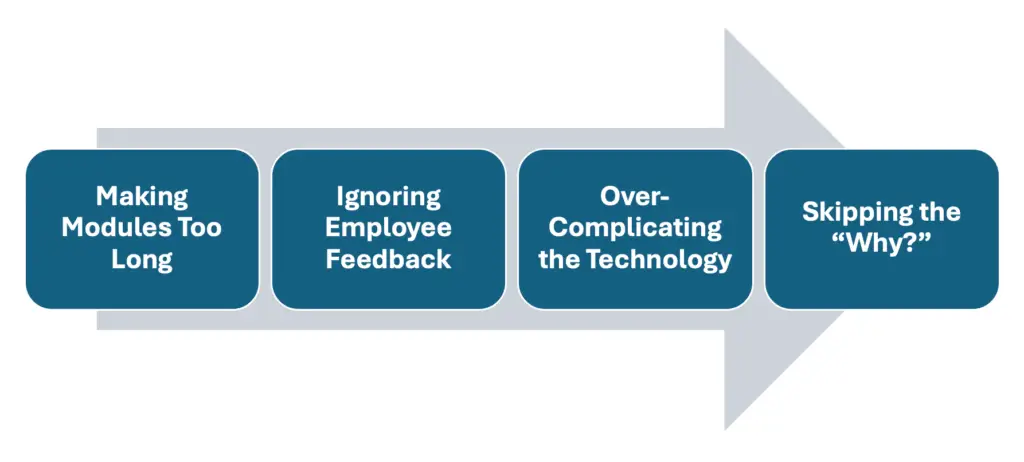
Mistake #1: Making Modules Too Long
Stretch a module past 10 minutes and you’ve lost the whole point. Cut it back to the most crucial information and stop there.
Mistake #2: Ignoring Employee Feedback
Microlearning lives on continuous improvement. Let employees rate modules, leave comments, and suggest topics. That feedback loop is worth more than any vendor brochure.
Mistake #3: Over-Complicating the Technology
Plenty of SMBs assume they need an expensive, enterprise-grade system. They don’t. A simpler platform — or even a private YouTube channel for quick videos — works perfectly well, especially if you’re just getting started.
Mistake #4: Skipping the “Why?”
People learn better when they know why something matters. Tie every module to a real-world payoff — saving time, serving customers better, or closing more sales.
Examples of Microlearning Employee Training & Courses
To make it concrete, here are some examples of microlearning courses you could build quickly:
- Software Updates
- A five-minute video walking through the new features.
- A short quiz to confirm understanding.
- An optional infographic summarising the changes.
- Customer Service Excellence
- A scenario-based module built around real customer complaints.
- Employees choose the best response and get immediate feedback.
- A leaderboard to recognise top-performing individuals.
- Compliance & Safety
- A series of 2–5-minute lessons covering the essential policy points.
- An end-of-module test using real-life case studies.
- Immediate pass/fail results, with the option to retake.
- Sales Training Refresher
- A daily tip on handling objections or product specs.
- A weekly wrap-up with a short interactive quiz.
- Ongoing recognition for top scorers to keep motivation high.
Best Practices for Long-Term Success
- Blend microlearning with other methods
It doesn’t have to replace everything. Pair it with short webinars, in-person discussions, or mentoring for a rounded approach. - Use peer learning
Let the people who excel at a task build their own mini modules. It offloads content creation and builds a real sense of ownership across the team. - Stay agile
Business moves fast. Keep modules current with the latest internal policies and product changes — short bursts are easy to update, so use that to your advantage. - Measure ROI
Track both the qualitative and the quantitative:- Employee satisfaction with the training
- Time saved against the old approach
- Performance metrics such as sales numbers and customer satisfaction scores
Once you see the numbers, you’ll know exactly what microlearning is doing to your bottom line.
A Worked Example: How One SMB Cut Training Costs by 50%
Picture a small software startup of 40 people, spending thousands every quarter just to onboard. Swap their day-long sessions for microlearning modules covering everything from product knowledge to HR policy, and the maths changes quickly.
- Result 1: training time per new hire drops from eight hours to under three.
- Result 2: retention climbs — quiz scores improve by 25%.
- Result 3: overall training costs fall by half, freeing budget for marketing and product.
The pattern is the same one we see again and again: new hires feel confident sooner, and the founder gets their training spend back in growth. It isn’t magic — it’s just the right format for the way people actually learn.
FAQ: Your Microlearning Questions Answered
What’s the fastest way to implement microlearning in a small business?
Start with your most common pain points — compliance, sales, or customer service. Create or source short videos and quizzes on those topics, then deliver them through a simple LMS, or even email links if you’re on a tight budget.
Do I need a dedicated LMS platform to run microlearning courses?
It helps for tracking and analytics, but it isn’t mandatory. Some SMBs use YouTube, Slack, or even private podcasts as interim solutions. Over time, move to a user-friendly platform that can grow with you.
How often should I update microlearning modules?
Quarterly at minimum, and any time you have a major policy change, software update, or new product. That agility is one of microlearning’s biggest advantages.
Can microlearning work for hands-on roles or field workers?
Yes. Technicians, drivers, and frontline staff can complete modules on their phones during downtime, and apply short, relevant lessons in the field straight away.
Is microlearning effective for advanced skills like coding or engineering?
It can be, especially for specific tasks or advanced concepts broken into smaller increments. For comprehensive training, blend it with more in-depth courses.
Make Your Training Something Staff Actually Want to Use
Most SMBs don’t have the luxury of long training sessions or a dedicated learning department — and they don’t need one. Microlearning, delivered in short, engaging bursts, gives your people training they’ll finish, remember, and use. Less downtime, lower cost, better retention, and a team that gets up to speed faster. That’s a training budget finally working for you instead of against you.
Additional Resources (Internal & External Links)
- Internal: How to measure ROI on digital training
- External:
- LinkedIn Learning for curated microlearning modules
- Harvard Business Review for the latest thinking on workplace training
- Training Industry for platform reviews and expert articles
Related reading
- Elearning Course Design South Africa: Master 2
- Measuring eLearning ROI in South Africa: A 202
- WordPress LMS Comparison South Africa: The 202
- How to Create a SETA Accredited Online Course:
Ready to put this into action?
If you’d rather have a team that does this every day, we’re here. Book a free 20-minute consult and we’ll give you the three highest-impact next steps for your business — no obligation.